HOWTO
Applies To:
ITScriptNet Indago
When using a Postgres database to store collected data, the error "Type lo does not exist" appears in the OMNI Server log file when saving Images (Image Capture or Digital Ink) to a binary field of type bytea.
Example log file entry:
2015/07/07 13:55:23.337,12345,98765,-1,4.0.1.0,4.0.1.0,25,1,882,Error Inserting the collected data: ERROR [42704] ERROR: type "lo" does not exist;
Error while executing the query
DETAILS
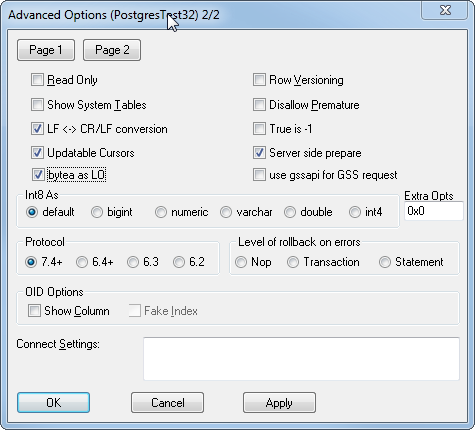
There is a setting you can change in the ODBC Driver settings to address this problem.
Set the "bytea as lo" option as shown.
For more information, see these links:
http://www.postgresql.org/message-id/[email protected]
http://www.postgresql.org/message-id/[email protected]
This article last updated:
7/23/2015 10:58:58 AM